


Question for computer/tv heads


Question for computer/tv heads
I have a noobie question, so I connected my laptop to my hdtv with a vga cable, so now I can use my tv screen, but the thing is the sound is still playing from my laptop. What cable/thingy do I need to transfer the sound thats playing from my laptop to my tv speakers?
Tia,
Tia,

Registered User
iTrader: (7)
Joined: May 2007
Posts: 977
From: Fremont/Davis, CA
Car Info: 96 gm(sold), 98 bk, 02 sf
I think you can get one of those 3 input things (don't know what they're called  ) and plug one end into the computer and the other into the a/v port in the tv. I think you can just get an AUX cable, too.
) and plug one end into the computer and the other into the a/v port in the tv. I think you can just get an AUX cable, too.
Last edited by y0ungsubi3; Dec 14, 2007 at 11:08 PM.

Registered User
iTrader: (4)
Joined: May 2005
Posts: 420
From: San Jose
Car Info: 2013 WRX Hatchback
It depends on what audio inputs are associated with the vga input on your TV, unless you have a receiver. When I had my computer hooked up to a 40'' sony lcd using the VGA cable, the TV had an input for a 3.5mm jack so I ran male-to-male 3.5mm from the speaker output on the computer to the TV. I just switched inputs, so now I've got the computer hooked up to the TV using hdmi. Now, I use a 3.5mm to rca adapter, then RCA's into my TV's audio input associated with the hdmi.
Let me know what your tv/reciever has and I'll tell you the best cables for the job.
Let me know what your tv/reciever has and I'll tell you the best cables for the job.

It depends on what audio inputs are associated with the vga input on your TV, unless you have a receiver. When I had my computer hooked up to a 40'' sony lcd using the VGA cable, the TV had an input for a 3.5mm jack so I ran male-to-male 3.5mm from the speaker output on the computer to the TV. I just switched inputs, so now I've got the computer hooked up to the TV using hdmi. Now, I use a 3.5mm to rca adapter, then RCA's into my TV's audio input associated with the hdmi.
Let me know what your tv/reciever has and I'll tell you the best cables for the job.
Let me know what your tv/reciever has and I'll tell you the best cables for the job.
3.5mm male on one end, and stereo RCA on the other end (Red/White).Sometimes you need 3.5mm male to male, but that's rare. Check your owners manual first for the TV.
Radioshack has 'em.
If you want nicer cables, get them from www.monoprice.com
Last edited by joltdudeuc; Dec 15, 2007 at 02:47 AM.

Yeah so the 3.5mm to RCA(red, white) wont work for me.. I tried plugging the red and red into every red white component and still no sound... I checked out the back of the tv where I pluged in my vga cable into the "PC IN", and right next to it is a plug called "PC IN AUDIO".. I dont know what cable thats called, but it basically it looks like a whole with like a square surrounding. So yeah only 1 plug into the tv... hope that makes sense
kind of looks like this.
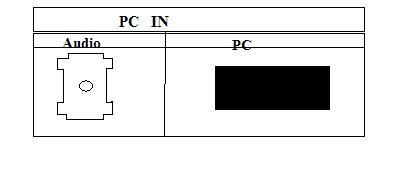
Could it be this cable? Im not sure
http://www.buy.com/prod/Belkin-AV200...202479364.html
tia
kind of looks like this.
Could it be this cable? Im not sure
http://www.buy.com/prod/Belkin-AV200...202479364.html
tia
Last edited by wrxguy; Dec 15, 2007 at 07:08 PM.
Registered User
iTrader: (4)
Joined: May 2005
Posts: 420
From: San Jose
Car Info: 2013 WRX Hatchback
Whats the brand and model of the TV? I'll d/l the manual/specs and tell you what cable you need.
That cable is an optical audio cable. I highly doubt your TV is expecting your computer to have optical out, but maybe.
That cable is an optical audio cable. I highly doubt your TV is expecting your computer to have optical out, but maybe.


Thread
Thread Starter
Forum
Replies
Last Post
jaytheman
Bay Area
26
Feb 5, 2010 07:52 AM
EJ20Legacy
NorCal Classifieds
11
Nov 13, 2006 05:47 PM
gruppe-s
NorCal Classifieds
5
Jul 21, 2005 08:32 AM