


Wednesday, June 6th, 2007


Registered User
iTrader: (3)
Joined: Feb 2005
Posts: 10,232
From: Front pleated TWill pants...
Car Info: 2004 PSM WRX



plays well with others
iTrader: (1)
Joined: Aug 2006
Posts: 9,923
From: Sac
Car Info: your mother crazy
Dear Senior Paulo,
TY for making the fuze for the EDFC awesome and accessable... matt tapped off it
TY for making the fuze for the EDFC awesome and accessable... matt tapped off it
Last edited by Irrational X; Jun 6, 2007 at 10:31 PM. Reason: ninja

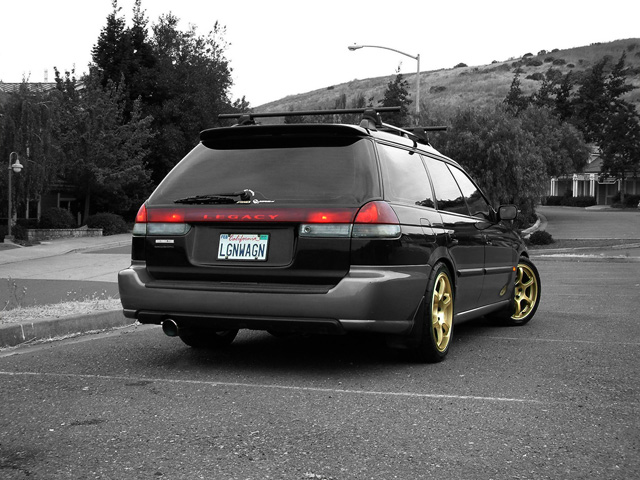
So I found a short and sort of vague tutorial on making pictures that are b&w but have 1 color or area selected. And I've always wanted to try this, so I figured I'd post my results on here and see what you guys think versus the original.
Do you like the full sized image or the croped one better? ps: I dulled the yellow a bit to bring out the reflection.
Cropped:

Full size:

Do you like the full sized image or the croped one better? ps: I dulled the yellow a bit to bring out the reflection.
Cropped:
Full size:

Warm Fuzzy Admin
iTrader: (45)
Joined: Mar 2001
Posts: 13,799
From: Sacramento, CA
Car Info: 97 LOB, 05 FXT, 03 Tundra
I like selective color, but for me it has to be in a less busy (or much more busy) environment for it to work; either picking an object or person out of fine detail, or bringing out an element in a more stark picture. I think the non-cropped one looks better for that reason; it's also framed better and doesn't have floating legs that distract on the edges. I do like that accent on the nosepiece as it emphasizes the only painted part on those cars. I'd find some other little color splashes you can add; it will lead people's eyes to"fill in" the missing colors, and an image like that is made to make someone imagine the scene.
I like doing smaller elements on cars, like this:
You almost have to look twice to see what's going on (that everything else is desaturated), which is my preference. My favorite part of this picture is the reflection of the wheel in the fender. Adding color to that area brings it out as a focal point in the image, whereas in color it would get lost in the slate/brown color of the car's lower panel.
The spread of nicer cameras means more people are trying new things, which is great, but I think too many effects are overused and detract from what can be a great image; people over-process and filter and modify and edit instead of focusing on composition and accentuating images.
The new HDR thing is like that; everyone jumps on the bandwagon; it looks cool in some shots, and I want to play with it, but 90% of the pictures I see are blown out or haloed or washed out and ghostly, when someone could have gotten a really cool effect by just waiting for the right light and playing with composition instead of tons of post-processing. People focus so much ont he effect that they lose the original concept; HDR was developed as a way to accuratley reproduce the varying focus and intensity levels the human eye can discern in a single scene with large disparities in focal depth or lighting, not as an "OMG MY PICTURE LOOKS GHOSTLY OMG."
But I digress.
Constantly.
I like doing smaller elements on cars, like this:
You almost have to look twice to see what's going on (that everything else is desaturated), which is my preference. My favorite part of this picture is the reflection of the wheel in the fender. Adding color to that area brings it out as a focal point in the image, whereas in color it would get lost in the slate/brown color of the car's lower panel.
The spread of nicer cameras means more people are trying new things, which is great, but I think too many effects are overused and detract from what can be a great image; people over-process and filter and modify and edit instead of focusing on composition and accentuating images.
The new HDR thing is like that; everyone jumps on the bandwagon; it looks cool in some shots, and I want to play with it, but 90% of the pictures I see are blown out or haloed or washed out and ghostly, when someone could have gotten a really cool effect by just waiting for the right light and playing with composition instead of tons of post-processing. People focus so much ont he effect that they lose the original concept; HDR was developed as a way to accuratley reproduce the varying focus and intensity levels the human eye can discern in a single scene with large disparities in focal depth or lighting, not as an "OMG MY PICTURE LOOKS GHOSTLY OMG."
But I digress.
Constantly.
Last edited by sybir; Jun 6, 2007 at 10:21 PM.
I like selective color, but for me it has to be in a less busy (or much more busy) environment for it to work; either picking an object or person out of fine detail, or bringing out an element in a more stark picture. I think the non-cropped one looks better for that reason; it's also framed better and doesn't have floating legs that distract on the edges. I do like that accent on the nosepiece as it emphasizes the only painted part on those cars. I'd find some other little color splashes you can add; it will lead people's eyes to"fill in" the missing colors, and an image like that is made to make someone imagine the scene.
I like doing smaller elements on cars, like this:
I like doing smaller elements on cars, like this:
As for the other parts, I thought about adding the headlights, thinking that they will not distract much, but like you suggested, be a subtle touch. If I didn't have such an unsteady hand, I would try to also get the smaller lights and their reflection on the front spoiler.
Thanks for the advice/feedback.
Registered User
iTrader: (3)
Joined: Feb 2005
Posts: 10,232
From: Front pleated TWill pants...
Car Info: 2004 PSM WRX
jvick, I like the full-sized the best, it shows what else is going on around the car.
I was playing around with the selective color effect a bit when I found out how easy it was...here are a couple of mine just for fun...


I was playing around with the selective color effect a bit when I found out how easy it was...here are a couple of mine just for fun...
Registered User
iTrader: (3)
Joined: Feb 2005
Posts: 10,232
From: Front pleated TWill pants...
Car Info: 2004 PSM WRX
I used PS CS2 and followed the tutorial on Digital Photography School (great email or RSS feed to subscribe to). And actually I ended up following the instructions in one of the comments. I guess there's a difference between black & white and desaturate, the article says to use desaturate then use the history brush to paint back the color. The comment says to create a B&W layer over the color layer, then use the paint brush to erase the B&W layer. I guess the detail is better using this 2nd method.
See the first comment here.
Last edited by T-Will; Jun 6, 2007 at 11:34 PM.
I did the B&W layer and a color layer. I selected the parts I wanted to remain color then erased them so that they were "hollow" and then put that onto of the color layer. What I'm asking really is how did you select the flowers so well? Like I have a bit of a hard time selecting the area I want color. It might be because I have PS6.
Last edited by jvick125; Jun 6, 2007 at 11:50 PM.