


Official Nintendo DS Game Discussion Thread


Thread Starter
VIP Member
iTrader: (5)
Joined: Jul 2004
Posts: 10,118
From: Walnut, CA
Car Info: 2005 Pooparu
Official Nintendo DS Game Discussion Thread
Thru franco's persuasion i went out and bought a dsi.
1st game i bought was brain age.

Awesome game to play everyday to train your analytical and math skills.
Game I want.
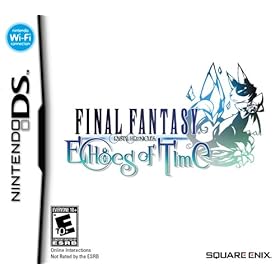


Release August 09'

1st game i bought was brain age.
Awesome game to play everyday to train your analytical and math skills.
Game I want.
Release August 09'
Last edited by kenji815; May 19, 2009 at 01:59 PM.


 im happy


Thread Starter
VIP Member
iTrader: (5)
Joined: Jul 2004
Posts: 10,118
From: Walnut, CA
Car Info: 2005 Pooparu

Registered User
Joined: Aug 2003
Posts: 6,403
From: Stuck somewhere in traffic
Car Info: 06 wrx
here is what you need
http://gizmodo.com/5252155/pirates-b...ith-the-dsonei
http://gizmodo.com/5252155/pirates-b...ith-the-dsonei

Registered User
iTrader: (1)
Joined: Oct 2003
Posts: 5,967
From: ubermeister of pr0n
Car Info: oh seben lay-gah-C
Thread Starter
VIP Member
iTrader: (5)
Joined: Jul 2004
Posts: 10,118
From: Walnut, CA
Car Info: 2005 Pooparu


Registered User
Joined: Apr 2009
Posts: 2
From: Livermore
Car Info: WRX 07
Nds - ipod
Have you tried "LMP-ng"?  I have tried it on both the NDS and DSI. You can find it here: http://www.cecm.usp.br/~lucas/lmp-ng/
I have tried it on both the NDS and DSI. You can find it here: http://www.cecm.usp.br/~lucas/lmp-ng/
Thread Starter
VIP Member
iTrader: (5)
Joined: Jul 2004
Posts: 10,118
From: Walnut, CA
Car Info: 2005 Pooparu
How to upload music to your NDSi
Requirement:
Nintendo DSi
SD Memory Card
Computer with iTunes
Instruction:
1. Create new play list in iTunes
2. Drag and Drop the music files (mp3, wav, etc.) into the new play list in iTunes
3. Right click on the music files in the play list and select convert selection to AAC format.
4. It will take few minutes for iTunes to process the converting.
5. Drag and Drop newly converted AAC files from iTunes to your SD memory card.
6. Insert SD memory in your Nintendo DSi
7. Select DS Nintendo DSi sound and Enjoy.
Requirement:
Nintendo DSi
SD Memory Card
Computer with iTunes
Instruction:
1. Create new play list in iTunes
2. Drag and Drop the music files (mp3, wav, etc.) into the new play list in iTunes
3. Right click on the music files in the play list and select convert selection to AAC format.
4. It will take few minutes for iTunes to process the converting.
5. Drag and Drop newly converted AAC files from iTunes to your SD memory card.
6. Insert SD memory in your Nintendo DSi
7. Select DS Nintendo DSi sound and Enjoy.
Thread Starter
VIP Member
iTrader: (5)
Joined: Jul 2004
Posts: 10,118
From: Walnut, CA
Car Info: 2005 Pooparu
Homebrew Apps
Multimedia Players
Moonshell 2

Is in my opinion the best media player for the ds.
Its does support many file formats (Details)
Here is the site of the developer Moonlight. Click
This is a link to download the last stable version of Moonshell Click.
Lick's Media Player (LMP-ng)

This one is also an media player an ipod clone.
Here is the site of the current developer Click
And here is the link to download the last stable version Click.
DS PDA Homebrew
DSOrganize

Well this is an PDA homebrew for the ds it haves an address book,calender,day planner,scribble pad,a browser to browse maps you can listen music or look at some pictures,Calculator,IRC,Web browser and an homebrew database you can download some demos,homebrew apps/games from there but the most of the homebrew are outdated most of them has newer version.
The site of the developer Click
Download the last stable version DSOrganize 3.1129
Ds Web Browsers
Bunjalloo

Bunjalloo is a web browser for the Nintendo DS. It is free software under and active development. Already Bunjalloo can display simple pages, follow links and view images. And so far one of the greatest slot 1 web browsers.
The site of the developer Click
Download the last stable version Click
DSOrganize
You also could use DSOrganize web browser its very good to but it has often memory crashes.
DSHobro

DSHobro is a homebrew that lets you surf the web on your DS.
It is based on a PC application that parses web pages, and sends the result to the DS.
The developer also haves an own blog Click.
The latests version is DSHobro 0.4 and here the link with Guide Click.
GBA Tools
GBA Exploader

GBA Exploader is an homebrew that use gba roms from slot 1 to transfer it on slot 2 so you can play GBA games.
The developer's site Click
The latests version Click
MSN ON DS
Beup Live

Beup is an ds homebrew for msn.
The developer's site Click
Download Beup Live 0.4
OS Replacements
DSision 2

DSision 2 is an alternative menu/os for flash carts graphical it looks very good
It does support DSTT/TTDS, AceKard, R4DS.
The developer's site Click
Download Click
Yasu Menu

Yasu Menu is an alternative menu for flash carts graphical it isn't very nice.
PDF VIEWER
Ands-pdf

Who did believe that an pdf viewer for the ds would be possible?
There is now an PDF viewer only your pdf files must be not to big or it will crash.
The developer's site Click
Download Click
Mail Clients
NDSMail

App for reading mail on your ds.
The developer's site Click
Download Click
Emulators for the Nintendo DS
Lameboy

Well the image describes what Lameboy is it's an Gameboy/GBColor Emulator for the Nintendo DS.
And its also the best of his kind.
The developer's site Click
Download Click
NesDS

NesDS is an nes emulator for the ds this require only slot 1 card.
The developer's site Click(He did remove NesDS)
Download Click
NesterDS

NesterDS is an native NES emulator based on PocketNES.
This requires a slot2 card
The developer's site Click
Download Click
Multimedia Players
Moonshell 2
Is in my opinion the best media player for the ds.
Its does support many file formats (Details)
Here is the site of the developer Moonlight. Click
This is a link to download the last stable version of Moonshell Click.
Lick's Media Player (LMP-ng)
This one is also an media player an ipod clone.
Here is the site of the current developer Click
And here is the link to download the last stable version Click.
DS PDA Homebrew
DSOrganize
Well this is an PDA homebrew for the ds it haves an address book,calender,day planner,scribble pad,a browser to browse maps you can listen music or look at some pictures,Calculator,IRC,Web browser and an homebrew database you can download some demos,homebrew apps/games from there but the most of the homebrew are outdated most of them has newer version.
The site of the developer Click
Download the last stable version DSOrganize 3.1129
Ds Web Browsers
Bunjalloo
Bunjalloo is a web browser for the Nintendo DS. It is free software under and active development. Already Bunjalloo can display simple pages, follow links and view images. And so far one of the greatest slot 1 web browsers.
The site of the developer Click
Download the last stable version Click
DSOrganize
You also could use DSOrganize web browser its very good to but it has often memory crashes.
DSHobro
DSHobro is a homebrew that lets you surf the web on your DS.
It is based on a PC application that parses web pages, and sends the result to the DS.
The developer also haves an own blog Click.
The latests version is DSHobro 0.4 and here the link with Guide Click.
GBA Tools
GBA Exploader
GBA Exploader is an homebrew that use gba roms from slot 1 to transfer it on slot 2 so you can play GBA games.
The developer's site Click
The latests version Click
MSN ON DS
Beup Live
Beup is an ds homebrew for msn.
The developer's site Click
Download Beup Live 0.4
OS Replacements
DSision 2
DSision 2 is an alternative menu/os for flash carts graphical it looks very good
It does support DSTT/TTDS, AceKard, R4DS.
The developer's site Click
Download Click
Yasu Menu
Yasu Menu is an alternative menu for flash carts graphical it isn't very nice.
PDF VIEWER
Ands-pdf
Who did believe that an pdf viewer for the ds would be possible?
There is now an PDF viewer only your pdf files must be not to big or it will crash.
The developer's site Click
Download Click
Mail Clients
NDSMail
App for reading mail on your ds.
The developer's site Click
Download Click
Emulators for the Nintendo DS
Lameboy
Well the image describes what Lameboy is it's an Gameboy/GBColor Emulator for the Nintendo DS.
And its also the best of his kind.
The developer's site Click
Download Click
NesDS
NesDS is an nes emulator for the ds this require only slot 1 card.
The developer's site Click(He did remove NesDS)
Download Click
NesterDS
NesterDS is an native NES emulator based on PocketNES.
This requires a slot2 card
The developer's site Click
Download Click

